Sunday, 16 March 2014

Rooting and Installing Jelly Bean 4.3 CyanogenMod Custom ROM on Samsung Galaxy S II

Hi Friends,
I am going to walk you through how you can root Samsung Galaxy SII and install custom ROM on it such as ever popular CyanogenMod?  
Before we gonna install custom ROM, we have to root the phone.

What is rooting?
The android phones are based upon the Linux Operating System.  Only admin have the access to the root of the operating system. The process of giving root access or privilege to the all users and other applications in the operating systems is called rooting. Rooting the phone gives you power to change almost all aspects of the system and also gives you the necessary permissions to install the custom ROMs.

Statutory Warning: This site will not be responsible for any data loss  if you make any Mistakes and Bricked Devices. If you root your phone, it will void the  warranty.

Before we start with the rooting and Custom ROM installation, lets understand what are the resources required for the process and all the resources are available in the zip. Download it now.

1. Required for Rooting
1.1. GT-I9100_JB_ClockworkMod-Recovery_6.0.2.9.tar
1.2. Odin307.zip

2. Required for Custom ROM Installation
2.1. cm-10.2-20140126-NIGHTLY-i9100.zip
2.2. gapps-jb-20130813-signed.zip
2.3. CWM-SuperSU-v0.97.zip

3. Required Post-Installation
3.1. TriangleAway-v3.26.apk

4. Required Pre-Installation Check
4.1. RootCheckPro.apk

Hereafter I will refer the files with thier reference numbers like 1.1, 2.3, 3.1, etc.

Now I will let you know what are all the preparation required before starting the process.

1. Before we go any further put the files 2.1, 2.2 and 2.3 in Internal SD Card of your phone. If your phone have an External SD Card,  preferably you can put the files there also.
2. Root Access can be checked by Installing the Android App in the section 4.1. This app will show whether the phone is rooted or not. This step is not mandatory. But just to check the Root Access Status.
3. Make sure phone has sufficient battery backup. Preferably not less than 90%.

Now lets begin the actual process. I would request you to read each steps carefully and follow.
1. Turn the phone off and make sure it is fully off. To make sure it is off, you can even pull the battery out and put the battery back. Dont turn it on now. Keep the phone aside and follow the next step.
2. Unzip the archive 1.2 and open the application Odin3 v3.07.exe
3. Connect the USB Cable to the computer, Do NOT connect to the phone now.
4. In Odin3 v3.07 application, Click the PDA button and select the GT-I9100_JB_ClockworkMod-Recovery_6.0.2.9.tar,  Make sure only "Auto Reboot" and "F. Reset Time" options are selected and also make sure NOTHING is selected in the "PIT".

5. Now you turn on the phone in "Download Mode" by pressing Power Key + Home Key + Volume Down Key together for few seconds. Now we have the below screen.

6. Now press the Volume Up Key to continue to the "Download Mode".
7. Now connect the USB Cable to the phone and start flashing new kernel with the Odin. When you connect the USB Cable a Blue color will appear with the COM Port number as highlighted below.

8. If the Blue Color is appeared then press the "Start" button to start flashing the kernel. Below are some of the intermediate and final Odin screens.


9. After the flashing the phone will start rebooting. Prevent the booting by pulling out the battery. Put the battery back and follow the steps.
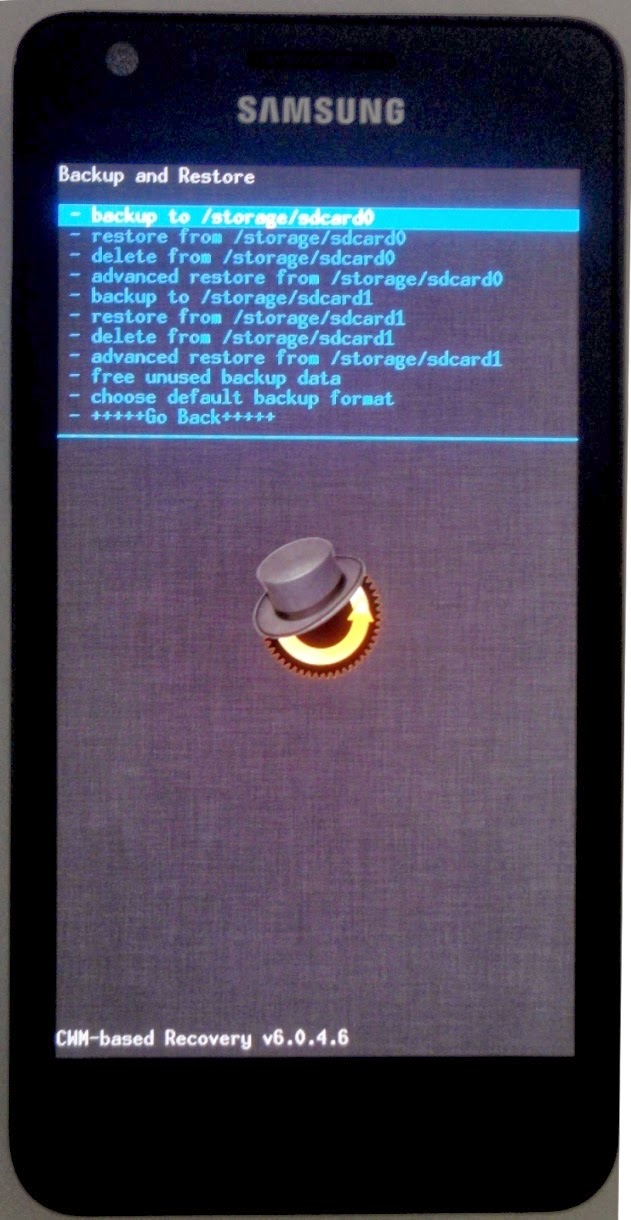
10. Now you turn on the phone in "Recovery Mode" by pressing Power Key + Home Key + Volume Up Key together for few seconds, the Samsung Logo with a yellow triangle will flash couple of times, keep holding the keys and finally we will have the recovery screen as below.

Now lets understand how to navigate the interface in Recovery Mode.

  • Volume Up Key       - Scroll Up
  • Volume Down Key - Scroll Down
  • Power Key               - Make your Selection

Some common understandings about the interface.

  • "+++++ Go Back +++++" is the option in the interface to go back to the previous screen.
  • "Install Zip" is the option used to install any zip file from the internal/exteranl storage.
  • "sdcard0" is the internal card and "sdcard1" is the external card.
  • "backup and restore" is the option to backup/restore the ROM.

Now we will continue the custom ROM installation.

11. First of all we will start process by backuping the existing ROM. Select the "backup and restore" option from the basic menu, from the "backup and restore" menu select "backup to /storage/sdcard0" (Internal) or "backup to /storage/sdcard1" (External) depend upon where do you want to backup the ROM. It may take 2-5 minutes.

12. After the backup is completed, select the "install zip" option, then now select "choose zip from /storage/sdcard0" (Internal) or "choose zip from /storage/sdcard0" (External) depending upon from where do you want to select the installation files, select the "CWM-SuperSU-v0.97.zip", now select "Yes - Install CWM-SuperSU-v0.97.zip" option to confirm and installation may take 2-3 minutes to complete.

13. Repeat the process to install "cm-10.2-20140126-NIGHTLY-i9100.zip" and then "gapps-jb-20130813-signed.zip". With this we have completed the installation. We have to do couple of more steps to complte the process.
14. Do a complete restore of the phone by selecting the option "wipe data/factory reset" option from the home menu. Before we do this make sure you have backed up the existing ROM explained in the step 11. Select option "Yes - wipe all user data" to begin the factory reset process. It may take a minute to complete.
15. Wipe the cache partition by selecting the "wipe cache partition" option, select "Yes - wipe cache" to confirm the process.
16. And finally from the advanced menu select the "wipe dalvik cache" option to wipe the dalvik cache.

17. Now we are ready to boot to the CynogenMod. Select "reboot system now" option to reboot the phone. Now you will see the Samsung Galaxy screen with yellow triangle and later CyanogenMod boot screen. Your phone is now rooted and running Cyanogen ROM instead of Stock ROM (Samsung Pre-installed ROM). Now you will prompted to sign in to Google Account and CynogenMod Account. You can skip this or you can enter the credentials to login.
18. We are coming to the completion of the installation. Only thing left for us is removing the yellow triangle we saw in the Samsung Boot screen. Follow the simple steps to do this. Please do not reboot the phone unless until the TriangleAway step is completed.
19. Install the TriangleAway-v3.26.apk Android App either from the sdcard or Google Play Store, open the application, you may be prompted to give super user access, provide the access. 
20. It will show a popup to confirm your phone model. In this case it is "GT-I1900", press "Continue", Press "Ok", Press "Ok" and Press "No Thanks" for succeeding popups.
21. Now press the "Reset Flash Counter" option, it will give you a warning, press "Continue", the phone will be rebooted into a reset flash counter mode (Almost like Download Mode), press the "Volume Up Key" to reset the counter, once the reset is done press the "Volume Up Key" again to reboot the phone normally and now you see that the Yellow Triangle has gone.

Here is your rooted phone with Custom Cyanogen ROM ! Keep reading my blog, like and share if it really helped you. Thanks

Tuesday, 11 March 2014

Audacity - How to remove Background Noise from the recording?

Audacity is the simple and free software to record audio at home. Since we do not have sound-proof rooms at home, there will be background noise (Noise is not the background sounds) in the audio we record. But there are techniques available in Audacity to remove this noise from the recorded audio with some simple steps.

Download it from here

Before we start please ensure that you record your voice in a silent room (Free from other sounds).

1. Open Audacity, record your voice and after the recording record the background audio (Also known as Noise) with out your sound (This is to sample the background noise).


2.Now select the audio part which does not contain your voice (The noise part). Then go to the menu
"Effect" -> "Noise Removal" and in the dialogue box select "Get Noise Profile"


3. Close the dialogue box, select the entire recording, again go to the menu "Effect" -> "Noise Removal", but this time, adjust the "Noise Reduction" to around 23, "Sensitivity" to -3, and "Frequency Smoothing" to 300, Click "Review" to check whether the noise has been removed, and If Yes, click "Ok".


Before and After Noise Removal

Record your sweet voice and Let the world hear that.

Thanks for reading my blog !

Sunday, 9 March 2014

SQL Server - Creating Index

Index is a database object created on a table to arrange records in such a way that the data can be searched quickly and efficiently. The table with index is best suitable when there is frequent search against the table. If the table is updated or new records are inserted frequently, the existence of Index will slow down this process. So it is not advisable to use Index on those kind of tables. There are different types Indices that can be created in SQL Server. Some of the options and types of Indices are explained below.

UNIQUE
Creates a unique index on a table or view. In case of UNIQUE index no two records are allowed to have same value on the fields the index is created upon. A clustered index on a view must be unique. UNIQUE Index cannot be created, if the table contains duplicate value even if the IGNORE_DUP_KEY property is set to ON. Only columns with NOT NULL constraint is allowed to be part of Unique Index columns. Multiple NULL values are considered as duplicate.

CLUSTERED
Creates an index which orders the key values physically as it is ordered logically. Only one clustered index is allowed for a table or view. Creating a unique clustered index on a view physically materializes the view. When we create unique Clustered Index on a view, it should be created before any other index is created on the view. Clustered Index should be created before creating any Non-Clustered indices. The word CLUSTERED is used to create the Clustered index, absence of the word will create a Non-Clustered Index. A view with a unique clustered index is called an indexed view.

NONCLUSTERED
Creates an index that specifies the logical ordering of a table. With a non-clustered index,  the records are ordered logically, not physically using index tables. The index keys are ordered as in the logical order specified and physical order is independent of logical order. A table can have maximum 999 Non-Clustered Indexes. Indexes can be created implicitly with PRIMARY KEY or UNIQUE or explicitly with CREATE INDEX.

In simple words, Clustered Indexes orders the records physically. Non-Clustered Indexes orders records logically. Below is the syntax for creating the indexes.

The difference between above 3 are: Unique index decides whether the key values are unique are not. Unique index allows only one NULL value in the key column whereas the Clustered allows multiple NULL values in key columns. Clustered and Non-clustered decides whether to organize records physically or logically.

CREATE [ UNIQUE ] [ CLUSTERED | NONCLUSTERED ] INDEX Index_Name 
    ON Table_Name ( column_1 [ ASC | DESC ] [ ,...n ] ) 
    [ WHERE <Filter_Condition> ]

Example 1:
CREATE UNIQUE INDEX IX_Emp_Tab 
    ON Emp_Tab ( emp_id ASC ) ;

Example 1 creates a Unique Index on the table Emp_Tab.

Example 2:
CREATE CLUSTERED INDEX IX_Emp_Tab 
    ON Emp_Tab ( emp_id ASC ) ;

Example 2 creates a Clustered Index on the table Emp_Tab and physically order the records on the basis of emp_id.

Example 3:
CREATE INDEX IX_Emp_Tab 
    ON Emp_Tab ( emp_id ASC ) ;

or

CREATE NONCLUSTERED INDEX IX_Emp_Tab 
    ON Emp_Tab ( emp_id ASC ) ;

Example 3 creates a Non-Clustered Index on the table Emp_Tab and order the records on the basis of emp_id logically.

Thanks for reading this post !

Thursday, 21 November 2013

Informatica - Java Transformation

This article explains the use of Java Transformation with an example.


We have input data as below.

And need to transform data in such a way that it creates 5 different records with EMI Sequence Number, due date and the outstanding or balance loan amount.

This transformation can be active or passive. When we think about transforming single record to multiple records, the first transformation comes to our mind is Normalizer Transformation. But for Normalizer transformation, a single record can be converted to fixed number of output records (Please refer my earlier post about Normalizer Transformation). In the example, different customers will have different tenure for loans. Lets see how this can be achieved with Java transformation.


Java Transformation: The ouput ports for the java transformation is created manually and uncheck the Input Check Box.

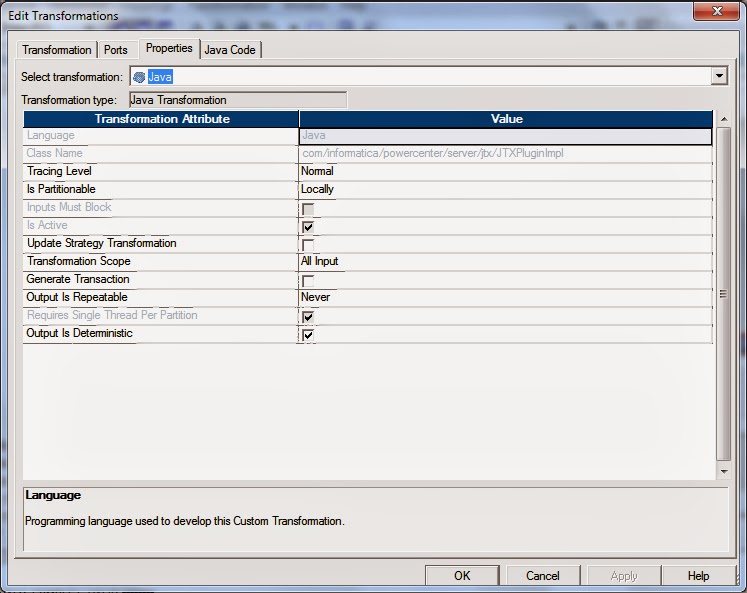
Below are the settings for the transformation.

And here is the java code written to transform the data under "On Input Row" tab. Code written under this tab will take each record and transform it.


Java Code

try
{
  DateFormat formatter = new SimpleDateFormat("dd/MM/yyyy");
  Calendar cal = Calendar.getInstance();
  int Yr, Mon;
  String DtStr;
  int loan_tenure;
  BigDecimal loan_amount, emi_amount;
   
  Date loan_st_dt = (Date)formatter.parse(LOAN_START_DT); 
  cal.clear();
  cal.setTime(loan_st_dt);
  cal.add(Calendar.MONTH, 1);
  Yr = cal.get(Calendar.YEAR);
  Mon = cal.get(Calendar.MONTH)+1;
  DtStr = "01/" + Mon +"/" + Yr;
  loan_st_dt = (Date)formatter.parse(DtStr);
  loan_tenure = 1;
  loan_amount = LOAN_AMT;
  emi_amount = LOAN_AMT.divide(new BigDecimal(LOAN_TNR), 6, RoundingMode.HALF_UP);

  do
  {
     loan_amount=loan_amount.subtract(emi_amount); 
     O_CUST_ID = CUST_ID;
     O_CUST_NM = CUST_NM;
     O_EMI_AMT = emi_amount;
     O_EMI_NUM = loan_tenure;
     O_EMI_DUE_DT = formatter.format(loan_st_dt);
     O_OS_EMI_AMT = loan_amount;
     generateRow();
     loan_tenure = loan_tenure +1;
     cal.clear();
     cal.setTime(loan_st_dt);
     cal.add(Calendar.MONTH, 1);
     loan_st_dt = (Date)cal.getTime();
  }while(loan_tenure <= LOAN_TNR);
}
catch (Exception e)
{
  System.out.println(e+" This is a wind message. - "+e.getMessage());
}

Expression Transformation: It converts the string to date.

Issues You might face are below:
Issue Snap:
Resolution:
Enable High Precision in Java Transformation and in the session properties.


Thanks for reading my article !


Friday, 15 November 2013

Informatica - Error: FnName: Execute -- [Informatica][ODBC SQL Server Wire Protocol driver]Inconsistent descriptor information.

This article tries to find solution for the below error scenario in Informatica.

Error Message:
WRT_8229    Database errors occurred:
FnName: Execute -- [Informatica][ODBC SQL Server Wire Protocol driver]Inconsistent descriptor information.
FnName: Execute -- [DataDirect][ODBC lib] Function sequence error

Error Scenario: When SMALLDATETIME column from source is moved to SMALLDATETIME column at target, all the records will be rejected at target.

Database: Both source and target are MS SQL Server 2008 database.

Solution:
1. Convert the SMALLDATETIME column to string using Expression Transformation. (SMALLDATETIME datatype length is 19 and the format is 'YYYY-MM-DD 24HH:MI:SS')

SUBSTR(DATE_COL, 1, 19) 


2.Change the Target Definition of the SMALLDATETIME column from SMALLDATETIME to VARCHAR(19) and keep the database table definition as it is.

3. Connect the converted date from expression to target and the issue is resolved.

It worked for me. You can also try the same !


Informatica - Normalizer Transformation Example

This article explains the use of Normalizer Transformation with an example.


We have source data as below.

And want output as below.

Normalizer Transformation: In this example, There are 4 different expense columns and it needs to be normalized. So define the output ports in the "Normalizer Tab" and set the "Occurs" to 4, since we have 4 columns to be normalized.


Expression Transformation: The "GK_" column (1, 2, 3, 4.....) is the sequence number for the normalized records and "GCID_" is the ordinal sequence of expense columns from the source (Here it is 1, 2, 3 and 4). Based on the "GCID_" value the Expense Type is calculated with DECODE function.


Download Workflow

Thanks for reading this article !


Informatica - Splitting a Flat File based on a column using Transaction Control


This article explains how to split records based on a particular column into multiple flat files using Transaction Control Transformation. Below given the Mapping and transformation Snapshots.

Mapping Snapshot

Sorter Transformation: Sorts the records based on column that used to split the file. In this example, it is JOB column.

Expression Transformation: After sorting based on JOB column. The first job column will be marked as '1' and rest marked as '0'. This helps the Transaction control to decide where to commit. It also calculates the file name for the group.

Transaction Control Transformation: It continue the transaction when the flag is 0 and commits the transaction before on 1.

Target Definition: Add the file name using the "Add Filename column to this table" button in the taget definition.

Download Workflow

Hope this helped you and thanks for reading this article !


Wednesday, 10 July 2013

MySQL - String Functions

Hi Everyone,

Here are the some of the string functions in MySQL . Before we start we should keep below points in mind.

  • String functions return NULL, if the length of the result would be greater than the value of the max_allowed_packet system variable.
  • For functions that operate on string positions, the first position is numbered 1.
  • For functions that take length arguments, non-integer arguments are rounded to the nearest integer.


ASCII(str
It returns the numeric value of the leftmost character of the string str. Returns 0 if str is the empty string. Returns NULL if str is NULL.

mysql> SELECT ASCII('2');
+------------+
| ASCII('2') |
+------------+
|              50 |
+------------+

mysql> SELECT ASCII(2);
+----------+
| ASCII(2) |
+----------+
|            50 |
+----------+

mysql> SELECT ASCII('dx');
+-------------+
| ASCII('dx') |
+-------------+
|              100 |
+-------------+


BIN(N)
It returns a string representation of the binary value of N, where N is a longlong (BIGINT) number. This is equivalent to CONV(N,10,2). Returns NULL if N is NULL.


mysql> SELECT BIN(12);
+----------+
| BIN(12)  |
+----------+
| 1100        |
+----------+


BIT_LENGTH(str)
It returns the length of the string str in bits.

mysql> SELECT BIT_LENGTH('Tech Volcano');
+------------------------------------+
|   BIT_LENGTH('Tech Volcano') |
+------------------------------------+
|                                                   96 |
+------------------------------------+


CHAR(N,... [USING charset_name])
This function interprets each argument N as an integer and returns a string consisting of the characters given by the code values of those integers. NULL values will be skipped.

mysql> SELECT CHAR(84,101,99,104,32,86,111,108,99,97,110,'111');
+---------------------------------------------------------+
| CHAR(84,101,99,104,32,86,111,108,99,97,110,'111') |
+---------------------------------------------------------+
| Tech Volcano                                                               |
+---------------------------------------------------------+

mysql> SELECT CHAR(111,111.5,111.7,'111.2');
+---------------------------------+
| CHAR(111,111.5,111.7,'111.2')  |
+---------------------------------+
| oppo                                          |
+---------------------------------+

CHAR_LENGTH(str) / CHARACTER_LENGTH(str)
It returns the length of the string str, measured in characters. A multi-byte character counts as a single character. This means that for a string containing five 2-byte characters, LENGTH() returns 10, whereas CHAR_LENGTH() returns 5.

mysql> SELECT CHARACTER_LENGTH('Tech Volcano');
+----------------------------------------------+
| CHARACTER_LENGTH('Tech Volcano') |
+----------------------------------------------+
|                                                                  12 |
+----------------------------------------------+

CONCAT(str1,str2,...) It concatenates all the arguments and produce the result. If all arguments are non-binary strings, the result is a non-binary string. If the arguments include any binary strings, the result is a binary string. A numeric argument is converted to its equivalent binary string form. It returns NULL if any argument is NULL.
mysql> SELECT CONCAT('Tech',' ','Volcano');
+--------------------------------+
| CONCAT('Tech',' ','Volcano') |
+--------------------------------+
| Tech Volcano                          |
+--------------------------------+

CONCAT_WS(separator,str1,str2,...)
It stands for Concatenate With Separator and is a special form of CONCAT(). The first argument is the separator for the rest of the arguments. The separator is added between the strings to be concatenated. The separator can be a string, as can the rest of the arguments. If the separator is NULL, the result is NULL.

mysql> SELECT CONCAT_WS(' ','Tech','Volcano');
+--------------------------------------+
| CONCAT_WS(' ','Tech','Volcano') |
+--------------------------------------+
| Tech Volcano                                  |
+------------------------------- ------+

ELT(N,str1,str2,str3,...)
It returns the Nth element of the list of strings: str1 if N = 1, str2 if N = 2, and so on. Returns NULL if N is less than 1 or greater than the number of arguments.

mysql> SELECT ELT(5,'Anything','and','Everything','in','IT');
+------------------------------------------------+
| ELT(5,'Anything','and','Everything','in','IT') |
+------------------------------------------------+
| IT                                                                     |
+------------------------------------------------+

FIELD(str,str1,str2,str3,...)
Returns the index (position) of str in the str1, str2, str3, ... list. Returns 0 if str is not found.

mysql> SELECT FIELD('IT','Anything','and','Everything','in','IT');
+-----------------------------------------------------+
| FIELD('IT','Anything','and','Everything','in','IT') |
+-----------------------------------------------------+
|                                                                               5 |
+-----------------------------------------------------+

FORMAT(X,D)
It formats the number X to a format like '9,999,999.99', rounded to D decimal places, and returns the result as a string. If D is 0, the result has no decimal point or fractional part.

mysql> SELECT FORMAT(12345.123456, 3);
+--------------------------------+
| FORMAT(12345.123456, 3)   |
+--------------------------------+
| 12,345.123                               |
+--------------------------------+

mysql> SELECT FORMAT(12345.1,4);
+-------------------------+
| FORMAT(12345.1,4)   |
+-------------------------+
| 12,345.1000                 |
+-------------------------+

mysql> SELECT FORMAT(12345.2,0);
+-------------------------+
| FORMAT(12345.2,0)   |
+-------------------------+
| 12,345                           |
+-------------------------+

HEX(str)/ HEX(N) /UNHEX(HxN)
For a string argument str, HEX() returns a hexadecimal string representation of str where each character in str is converted to two hexadecimal digits. The inverse of this operation is performed by the UNHEX() function.
For a numeric argument N, HEX() returns a hexadecimal string representation of the value of N treated as a longlong (BIGINT) number. This is equivalent to CONV(N,10,16). The inverse of this operation is performed by CONV(HEX(N),16,10).

mysql> SELECT 0x5465636820566F6C63616E6F, HEX('Tech Volcano'), UNHEX(HEX('Tech Volcano'));
+-------------------------------------+----------------------------------+------------------------------------+
| 0x5465636820566F6C63616E6F  | HEX('Tech Volcano')                | UNHEX(HEX('Tech Volcano')) |
+-------------------------------------+----------------------------------+------------------------------------+
| Tech Volcano                                 | 5465636820566F6C63616E6F | Tech Volcano                                |
+-------------------------------------+----------------------------------+------------------------------------+


mysql> SELECT HEX(255), CONV(HEX(255),16,10);
+------------+----------------------------+
| HEX(255) | CONV(HEX(255),16,10) |
+------------+----------------------------+
| FF              | 255                                   |
+------------+----------------------------+


INSERT(str,pos,len,newstr)
It returns the string str, with the substring beginning at position pos and len characters long replaced by the string newstr. Returns the original string if pos is not within the length of the string. Replaces the rest of the string from position pos if len is not within the length of the rest of the string. Returns NULL if any argument is NULL.

mysql> SELECT INSERT('Tec-----cano', 4, 5, 'h Vol');
+------------------------------------------+
| INSERT('Tec-----cano', 4, 5, 'h Vol')   |
+------------------------------------------+
| Tech Volcano                                         |
+------------------------------------------+


mysql> SELECT INSERT('Tec-----cano', -1, 5, 'h Vol');
+------------------------------------------+
| INSERT('Tec-----cano', -1, 5, 'h Vol')  |
+------------------------------------------+
| Tec-----cano                                          |
+------------------------------------------+


mysql> SELECT INSERT('Tec-----cano', 4, 50, 'h Vol');
+------------------------------------------+
| INSERT('Tec-----cano', 4, 50, 'h Vol') |
+------------------------------------------+
| Tech Vol                                                 |
+------------------------------------------+


INSTR(str,substr)
It returns the position of the first occurrence of substring substr in string str.

mysql> SELECT INSTR('Tech Volcano', 'vol');
+--------------------------------+
| INSTR('Tech Volcano', 'vol') |
+--------------------------------+
|                                              6 |
+--------------------------------+

mysql> SELECT INSTR('Tech Volcano', 'Voll');
+---------------------------------+
| INSTR('Tech Volcano', 'Voll') |
+---------------------------------+
|                                               0 |
+---------------------------------+


LCASE(str) / LOWER()
It returns the string str in lowercase.

mysql> SELECT LCASE('TECH VOLCANO');
+---------------------------------+
| LCASE('TECH VOLCANO')   |
+---------------------------------+
| tech volcano                            |
+---------------------------------+

mysql> SELECT LOWER('TECH VOLCANO');
+---------------------------------+
| LOWER('TECH VOLCANO') |
+---------------------------------+
| tech volcano                            |
+----------------------------- ---+

LEFT(str,len)
It returns the leftmost len characters from the string str, or NULL if any argument is NULL.

mysql> SELECT LEFT('TECH VOLCANO', 6);
+---------------------------------+
| LEFT('TECH VOLCANO', 6)  |
+---------------------------------+
| TECH V                                    |
+---------------------------------+
LPAD(str,len,padstr)
It returns the string str, left-padded with the string padstr to a length of len characters. If str is longer than len, the return value is shortened to len characters.

mysql> SELECT LPAD('Tech Volcano',15,'?');
+-------------------------------+
| LPAD('Tech Volcano',15,'?') |
+-------------------------------+
| ???Tech Volcano                   |
+-------------------------------+

mysql> SELECT LPAD('Tech Volcano',10,'?');
+---------------------------------+
| LPAD('Tech Volcano',10,'?')    |
+---------------------------------+
| Tech Volca                                |
+---------------------------------+

LTRIM(str)
It returns the string str with leading space characters removed.

mysql> SELECT LTRIM('  Tech Volcano');
+-----------------------------+
| LTRIM('  Tech Volcano')  |
+-----------------------------+
| Tech Volcano                     |
+-----------------------------+

MAKE_SET(bits,str1,str2,...)
It returns a set value (a string containing substrings separated by “,” characters) consisting of the strings that have the corresponding bit in bits set. str1 corresponds to bit 0, str2 to bit 1, and so on. NULL values in str1, str2, ... are not appended to the result.

mysql> SELECT MAKE_SET(1,'a','b','c');
+--------------------------+
| MAKE_SET(1,'a','b','c') |
+--------------------------+
| a                                     |
+--------------------------+

mysql> SELECT MAKE_SET(1 | 4,'a','b','c');
+-------------------------------+
| MAKE_SET(1 | 4,'a','b','c')   |
+-------------------------------+
| a,c                                          |
+-------------------------------+

mysql> SELECT MAKE_SET(1 | 4,'a','b',NULL,'d');
+--------------------------------------+
| MAKE_SET(1 | 4,'a','b',NULL,'d') |
+--------------------------------------+
| a                                                       |
+--------------------------------------+

mysql> SELECT MAKE_SET(0,'a','b','c');
+--------------------------+
| MAKE_SET(0,'a','b','c') |
+--------------------------+
|                                         |
+--------------------------+

MID(str,pos,len)
MID(str,pos,len) is a synonym for SUBSTRING(str,pos,len).

mysql> SELECT MID('Tech Volcano',3,5);
+----------------------------+
| MID('Tech Volcano',3,5) |
+----------------------------+
| ch Vo                                |
+----------------------------+

OCT(N)
It returns a string representation of the octal value of N, where N is a longlong (BIGINT) number. This is equivalent to CONV(N,10,8). Returns NULL if N is NULL.

mysql> SELECT OCT(12);
+------------+
| OCT(12)    |
+------------+
| 14              |
+------------+

OCTET_LENGTH()
It is a synonym for LENGTH().

mysql> SELECT OCTET_LENGTH(14);
+--------------------------+
| OCTET_LENGTH(14) |
+--------------------------+
|                                     2 |
+--------------------------+


QUOTE(str)
Quotes a string to produce a result that can be used as a properly escaped data value in an SQL statement. The string is returned enclosed by single quotation marks and with each instance of backslash (“\”), single quote (“'”), ASCII NUL, and Control+Z preceded by a backslash. If the argument is NULL, the return value is the word “NULL” without enclosing single quotation marks.

mysql> SELECT 'Don\'t!';
+-----------+
| Don't!       |
+-----------+
| Don't!       |
+-----------+


mysql> SELECT QUOTE('Don\'t!');
+---------------------+
| QUOTE('Don\'t!')  |
+---------------------+
| 'Don\'t!'                  |
+---------------------+


REPEAT(str,count)
It returns a string consisting of the string str repeated count times. If count is less than 1, returns an empty string. Returns NULL if str or count are NULL.


mysql> SELECT REPEAT('#', 5);
+------------------+
| REPEAT('#', 5)  |
+------------------+
| #####               |
+------------------+


REPLACE(str,from_str,to_str)
It returns the string str with all occurrences of the string from_str replaced by the string to_str. REPLACE() performs a case-sensitive match when searching for from_str.

mysql> SELECT REPLACE('w.techvolcano.co.in', 'w', 'www');
+--------------------------------------------------+
| REPLACE('w.techvolcano.co.in', 'w', 'www')  |
+--------------------------------------------------+
| www.techvolcano.co.in                                     |
+--------------------------------------------------+


REVERSE(str)
It returns the string str with the order of the characters reversed.

mysql> SELECT REVERSE('onacloV hceT');
+------------------------------+
| REVERSE('onacloV hceT') |
+------------------------------+
| Tech Volcano                       |
+------------------------------+


RIGHT(str,len)
It returns the rightmost len characters from the string str, or NULL if any argument is NULL.


mysql> SELECT RIGHT('Tech Volcano', 4);
+------------------------------+
| RIGHT('Tech Volcano', 4) |
+------------------------------+
| cano                                     |
+------------------------------+


RPAD(str,len,padstr)
It returns the string str, right-padded with the string padstr to a length of len characters. If str is longer than len, the return value is shortened to len characters.


mysql> SELECT RPAD('Volcano',10,'*');
+-------------------------+
| RPAD('Volcano',10,'*') |
+-------------------------+
| Volcano***                    |
+-------------------------+


mysql> SELECT RPAD('Volcano',6,'*');
+------------------------+
| RPAD('Volcano',6,'*') |
+------------------------+
| Volcan                         |
+------------------------+


RTRIM(str)
It returns the string str with trailing space characters removed.

mysql> SELECT RTRIM('Tech Volcano     ');
+-------------------------------+
| RTRIM('Tech Volcano     ')  |
+-------------------------------+
| Tech Volcano                        |
+-------------------------------+


SOUNDEX(str)
It returns a soundex string from str. Two strings that sound almost the same should have identical soundex strings. A standard soundex string is four characters long, but the SOUNDEX() function returns an arbitrarily long string. You can use SUBSTRING() on the result to get a standard soundex string. All nonalphabetic characters in str are ignored. All international alphabetic characters outside the A-Z range are treated as vowels.

expr1 SOUNDS LIKE expr2


This is the same as SOUNDEX(expr1) = SOUNDEX(expr2).


SPACE(N)
It returns a string consisting of N space characters.


mysql> SELECT CONCAT('Tech',SPACE(6),'Volcano');
+------------------------------------------+
| CONCAT('Tech',SPACE(6),'Volcano') |
+------------------------------------------+
| Tech      Volcano                                   |
+------------------------------------------+


SUBSTR(str,pos) / SUBSTR(str FROM pos) / SUBSTR(str,pos,len) / SUBSTR(str FROM pos FOR len)
SUBSTR() is a synonym for SUBSTRING().


mysql> SELECT SUBSTRING('Volcano',4);
+------------------------------+
| SUBSTRING('Volcano',4) |
+------------------------------+
| cano                                    |
+------------------------------+


mysql> SELECT SUBSTRING('Volcano' FROM 4);
+--------------------------------------+
| SUBSTRING('Volcano' FROM 4) |
+--------------------------------------+
| cano                                                |
+--------------------------------------+


mysql> SELECT SUBSTRING('Volcano',2,3);
+----------------------------------+
| SUBSTRING('Volcano',2,3)     |
+----------------------------------+
| olc                                              |
+----------------------------------+


mysql> SELECT SUBSTRING('Volcano', -3);
+--------------------------------+
| SUBSTRING('Volcano', -3)   |
+--------------------------------+
| ano                                          |
+--------------------------------+


mysql> SELECT SUBSTRING('Volcano', -5, 3);
+----------------------------------+
| SUBSTRING('Volcano', -5, 3) |
+----------------------------------+
| lca                                              |
+----------------------------------+


mysql> SELECT SUBSTRING('Volcano' FROM -4 FOR 2);
+-----------------------------------------------+
| SUBSTRING('Volcano' FROM -4 FOR 2) |
+-----------------------------------------------+
| ca                                                                  |
+-----------------------------------------------+


If len is less than 1, the result is the empty string.


SUBSTRING_INDEX(str,delim,count)
It returns the substring from string str before count occurrences of the delimiter delim. If count is positive, everything to the left of the final delimiter (counting from the left) is returned. If count is negative, everything to the right of the final delimiter (counting from the right) is returned. SUBSTRING_INDEX() performs a case-sensitive match when searching for delim.

mysql> SELECT SUBSTRING_INDEX('www.techvolcano.co.in', '.', 1);
+------------------------------------------------------------+
| SUBSTRING_INDEX('www.techvolcano.co.in', '.', 1) |
+------------------------------------------------------------+
| www                                                                                 |
+------------------------------------------------------------+


mysql> SELECT SUBSTRING_INDEX('www.techvolcano.co.in', '.', 2);
+------------------------------------------------------------+
| SUBSTRING_INDEX('www.techvolcano.co.in', '.', 2) |
+------------------------------------------------------------+

| www.techvolcano                                                            |
+------------------------------------------------------------+


mysql> SELECT SUBSTRING_INDEX('www.techvolcano.co.in', '.', -2);
+-------------------------------------------------------------+
| SUBSTRING_INDEX('www.techvolcano.co.in', '.', -2) |
+-------------------------------------------------------------+
| co.in                                                                                    |
+-------------------------------------------------------------+


TRIM([{BOTH | LEADING | TRAILING} [remstr] FROM] str), TRIM([remstr FROM] str)
It returns the string str with all remstr prefixes or suffixes removed. If none of the specifiers BOTH, LEADING, or TRAILING is given, BOTH is assumed. remstr is optional and, if not specified, spaces are removed.

mysql> SELECT TRIM('  volcano   ');
+----------------------+
| TRIM('  volcano   ') |
+----------------------+
| volcano                    |
+----------------------+


mysql> SELECT TRIM(LEADING 'x' FROM 'xxxvolcanoxxx');
+---------------------------------------------------+
| TRIM(LEADING 'x' FROM 'xxxvolcanoxxx') |
+---------------------------------------------------+
| volcanoxxx                                                         |
+---------------------------------------------------+
mysql> SELECT TRIM(BOTH 'x' FROM 'xxxvolcanoxxx');
+----------------------------------------------+
| TRIM(BOTH 'x' FROM 'xxxvolcanoxxx') |
+----------------------------------------------+
| volcano                                                        |
+----------------------------------------------+


mysql> SELECT TRIM(TRAILING 'ano' FROM 'volcano');
+----------------------------------------------+
| TRIM(TRAILING 'ano' FROM 'volcano') |
+----------------------------------------------+
| volc                                                               |
+----------------------------------------------+


UCASE(str)
UCASE() is a synonym for UPPER().


mysql> SELECT UPPER('Tech Volcano');
+---------------------------+
| UPPER('Tech Volcano') |
+---------------------------+
| TECH VOLCANO          |
+---------------------------+


Thanks for reading this article !